Your hotel runs on a whiteboard, a group text and a clipboard. It doesn’t have to.
Room status, repairs, shift handoffs, guest complaints and cash counts — in one place, on the desk computer and every staff phone.
- Built by a former Hilton & IHG Director of Operations
- $65/month per property
- Running the same week
Rather send details first? Request a demoAlready on Travera? Log inGet the app for iPhone or Android
Six problems every hotel has. One place that fixes them.
These are the moments that cost rooms, reviews and your team’s patience. Here’s what each one looks like in Travera — real screens, sample hotel.
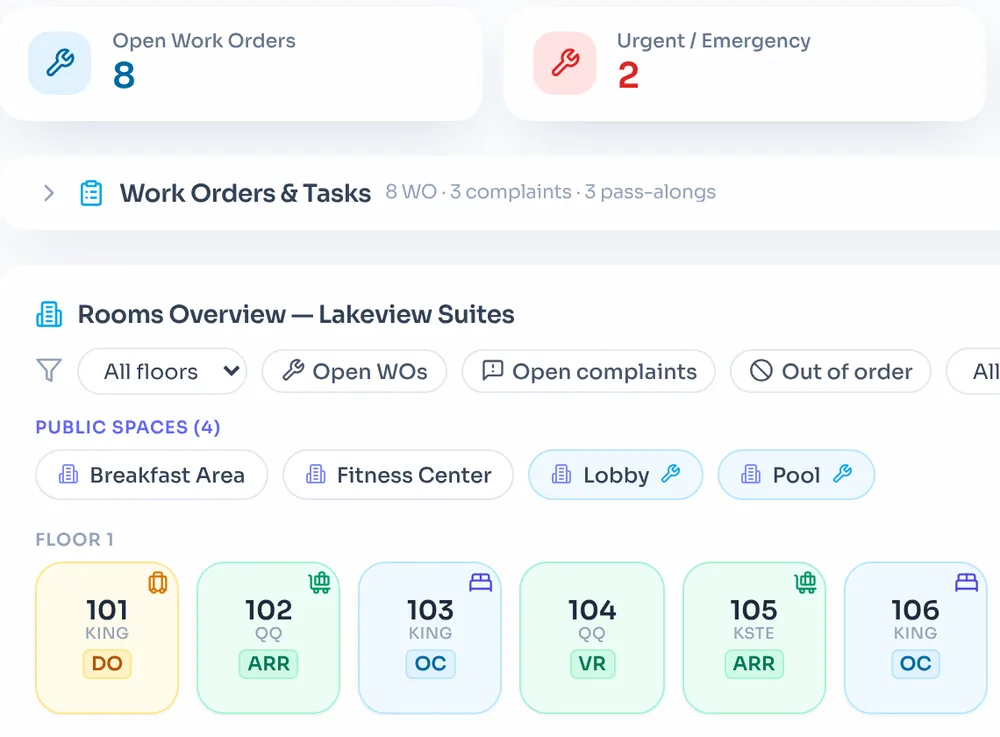
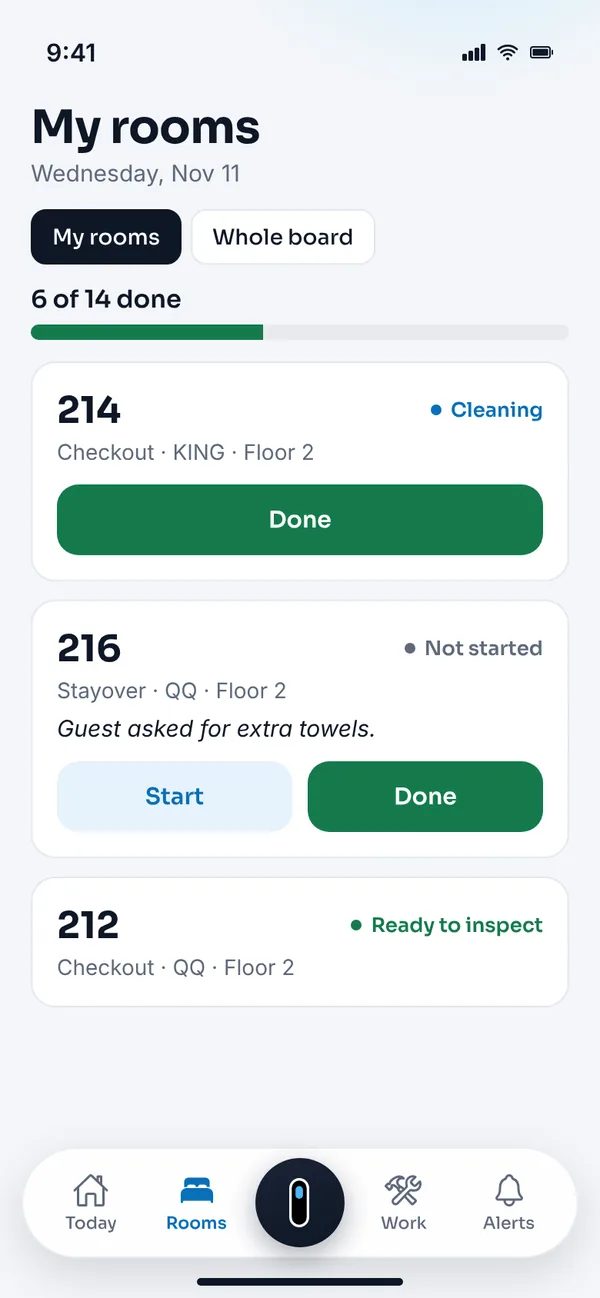
Is 214 clean yet?
— the front desk, all day long
Costs you: rooms sitting unsold and guests waiting in the lobby.
With Travera: Housekeepers tap Done on their phone. The desk sees it on the Ops Board right away, and the supervisor is told the room is ready to inspect.
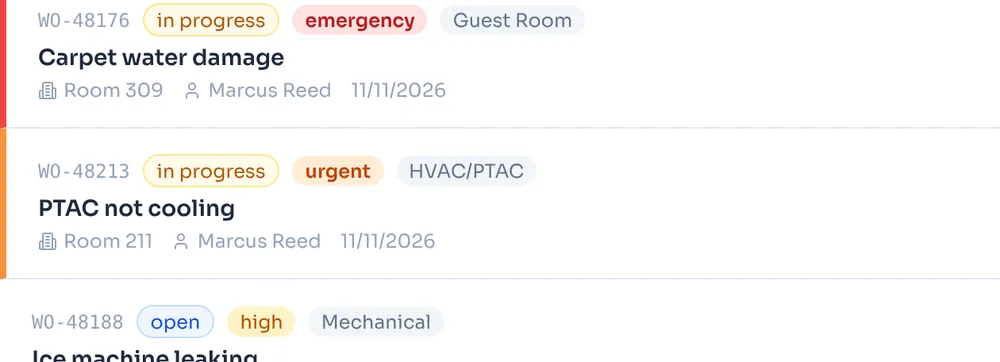
Who’s fixing the leak in 312?
— everyone, at the morning meeting
Costs you: repairs lost on sticky notes and guests complaining twice.
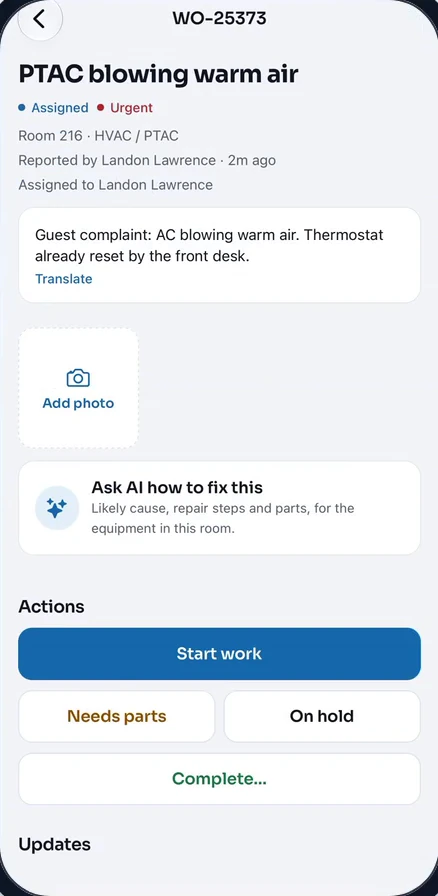
With Travera: Every repair is a work order with an owner, a priority, a photo and a status. Urgent jobs rise to the top.
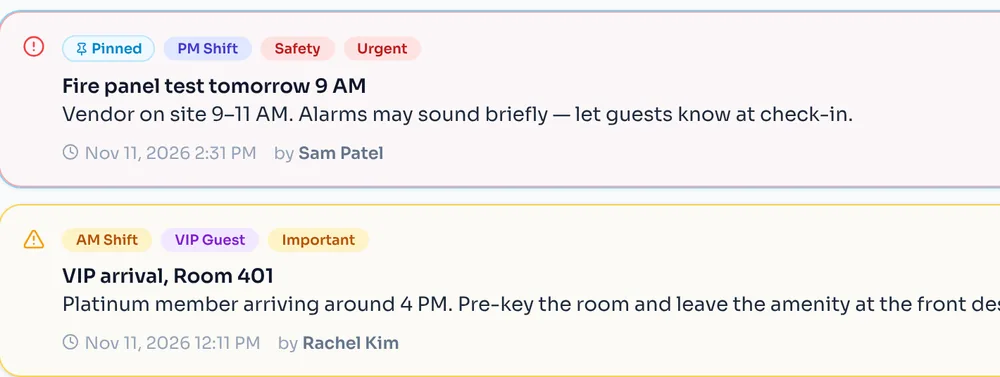
Nobody told me.
— the morning shift
Costs you: VIPs missed and the same problem solved twice.
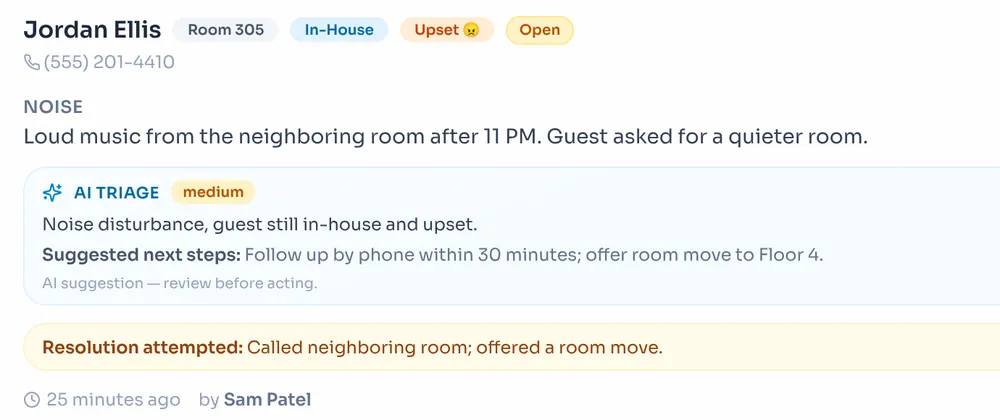
With Travera: Pass-along notes the next shift has to acknowledge, plus a pinned start-of-shift brief with open complaints and urgent work.
The guest called back. What did maintenance do?
— the night auditor
Costs you: a bad review and a comp you didn’t need to give.
With Travera: The room’s history shows the guest complaint and the finished work order together, with the tech’s notes.
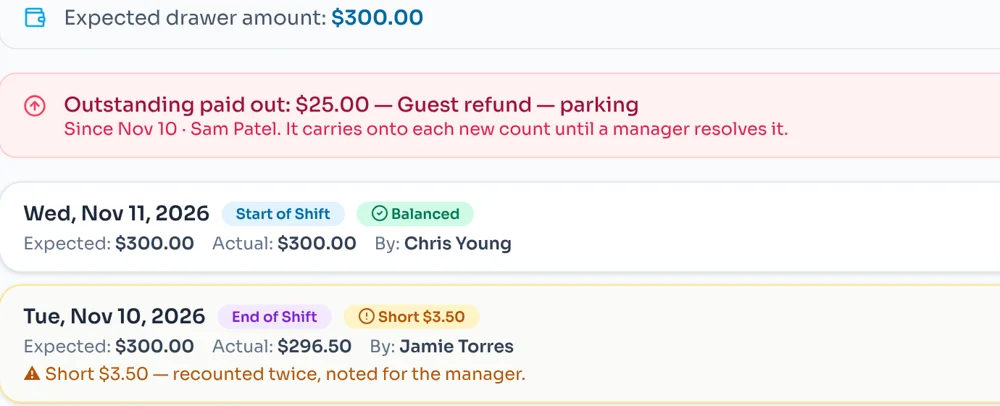
The drawer’s short again.
— the GM, after the weekend
Costs you: money you can’t trace and hours of recounting.
With Travera: Start- and end-of-shift counts with the variance worked out, and paid-outs that stay open until a manager clears them.
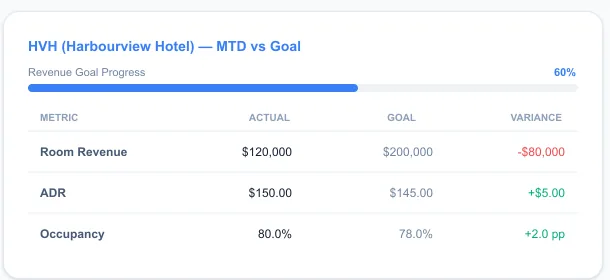
How are my other hotels doing?
— the management company
Costs you: finding out at month end, on a phone call.
With Travera: Revenue, ADR, occupancy and RevPAR against goal for every property, side by side.
Put your own numbers in.
Every “is it ready?” call, every lost repair and every recount takes time from someone who should be taking care of guests. Estimate it for your hotel.
Every department, on the same page — all day.
- 7:00
The shift starts briefed
A pinned note lists open complaints, out-of-order rooms and urgent work.
Front desk - 9:15
Rooms turn faster
Housekeepers tap Done; the supervisor inspects and the desk can sell the room.
Housekeeping - 10:42
A guest calls about the AC
Logged from the room on the Ops Board — the complaint and the work order together.
Front desk - 11:05
Fixed from the hallway
The tech starts the job, adds a photo and marks it complete on their phone.
Maintenance - 11 PM
The night closes clean
The drawer is counted, the variance is clear and tomorrow’s shift is set.
Night audit
Read the transcript
- When a guest calls back about their AC, can your front desk see what maintenance already did? With Travera, they can.
- Room 216 calls the desk. Your agent taps the room and logs the complaint: the guest’s mood, the problem, and what they already tried.
- From the same room, they create a work order for maintenance. Work order created: PTAC blowing warm air, urgent.
- Your tech picks it up in the Travera app, taps Start work, notes the fix by typing or by voice, and marks it complete. Status: completed — the fix is saved to the work order.
- Back at the desk, room 216’s history shows the complaint and the completed work order together, with the tech’s notes. When the guest calls back, your desk already knows what was done.
- Now meet Vera, the AI assistant built into Travera.
- Vera: “Hey Landon, Vera here. Your wish is my work order. What’s up?”
- Staff: “Hey Vera, the guest in 313 says the TV remote is missing and she’s upset.”
- Vera: “I’m sorry about that. I’ve drafted a complaint for the missing TV remote in 313. Do you want me to also send housekeeping a request for a replacement remote?”
- She drafts the complaint and suggests the next step. Nothing is saved until you confirm. And it’s on the Ops Board for everyone.
- Pass-Along hands each shift to the next, and can require the team to acknowledge it.
- Run more than one hotel? See them side by side.
- Travera. Your whole hotel, on the same page. Request a demo at traveraapp.com.
Narration is AI-generated.
See the AC call happen, start to finish.
The 2-minute tour follows one guest complaint from the front desk to maintenance and back — then shows Vera and the shift handoff. Real Travera screens with a test hotel.
Your team doesn’t fill out forms. They just say what happened.
Vera is the AI assistant built into the Travera app. Your team tells her what’s going on, the way they’d tell a manager. She checks your hotel’s live rooms and work orders, drafts what needs logging, and waits for a yes.
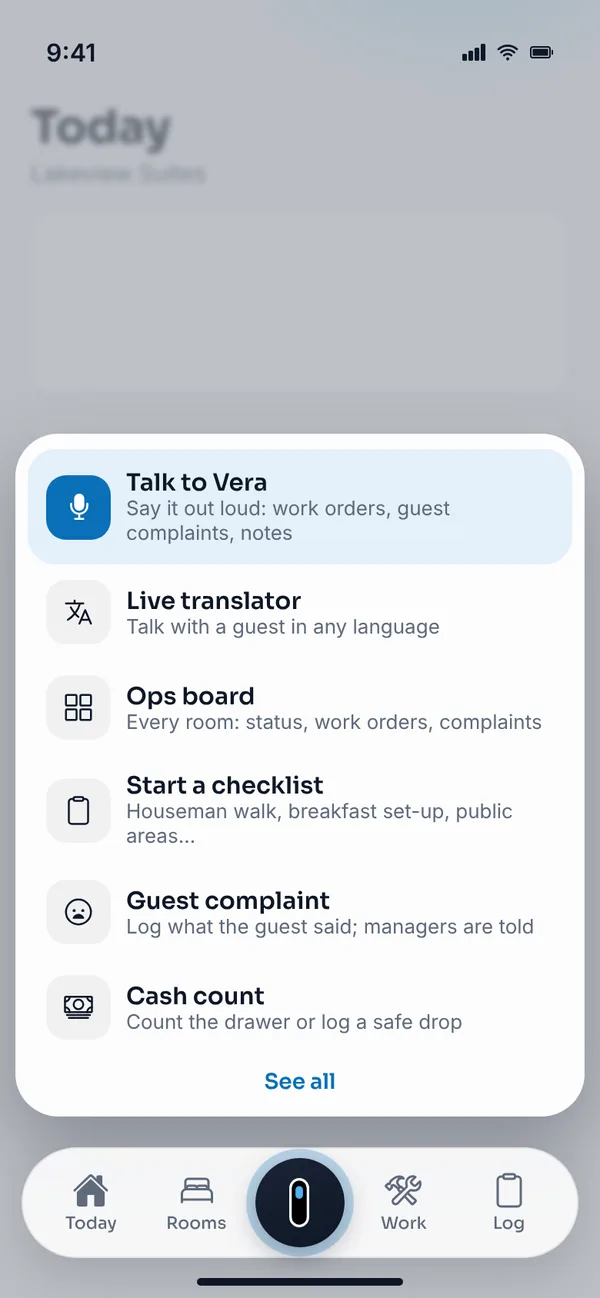
Tap the Travera button“Talk to Vera” is the first quick action for every role — front desk, housekeeping, maintenance and managers. 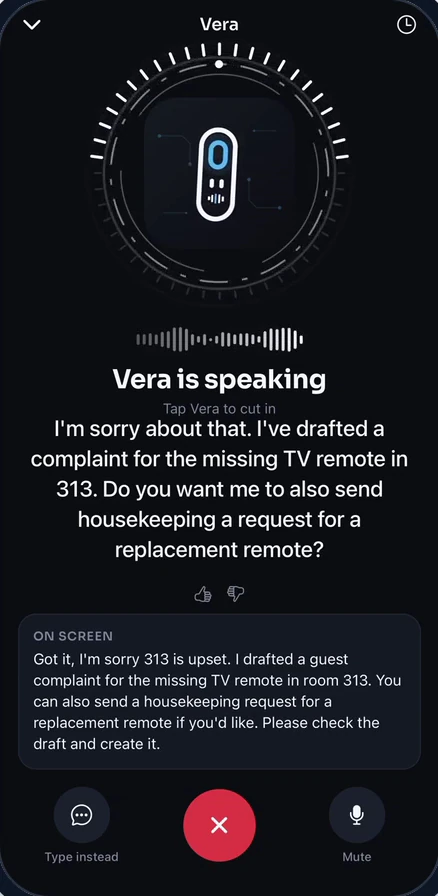
Say what happenedHands-free. Vera listens, answers out loud, drafts the paperwork and suggests the next step. 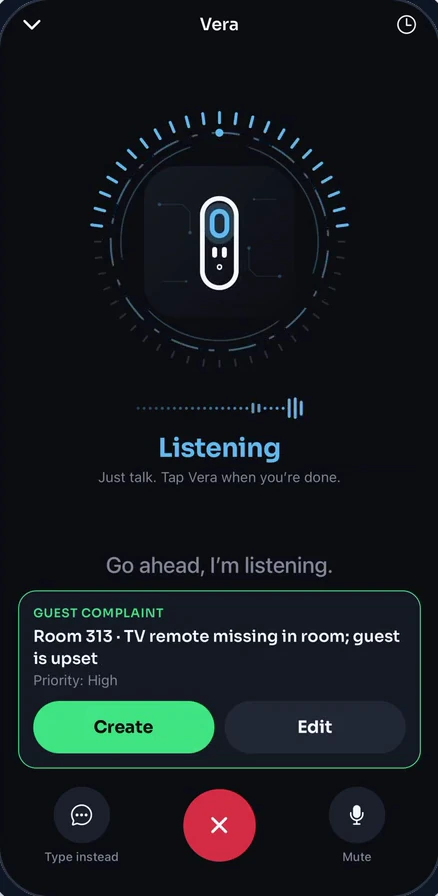
Check it and confirmVera’s draft appears on screen. Nothing is saved until you tap Create.
Pick something to tell Vera.
A sample conversation with a sample hotel. It runs right here in your browser — nothing is sent or saved.
Hi, I’m Vera. Tell me what’s going on and I’ll draft a work order or complaint, or ask me about rooms, work orders and pass-along notes.
- Drafts the paperworkA work order, a guest complaint, both, or a pass-along note — from one sentence.
- Answers from live data“What’s open in 211?” Vera checks rooms, work orders, pass-along notes, complaints, lost and found and packages.
- Acts only with your OKAsk her to mark a room clean or assign a work order. She proposes it; you confirm it.
- Reads a photoSnap & report: photograph the problem and Vera fills in the work order for you to check.
Vera works in Travera on the web and in the Travera iPhone and Android apps, now on the App Store and Google Play. She only sees what the person using her is allowed to see.
“I built Travera because I needed it. Every hotel deserves tools that make the job easier.”
Landon Lawrence, co-founder, spent six years on the night audit desk before running Hilton and IHG franchised hotels as Director of Operations. Travera wasn’t adapted for hotels — it was built by someone who has stood behind the desk when the AC goes out at 10 PM.
- 6 years on night audit
- Director of Operations
- Hilton & IHG franchised hotels
- In daily use at operating hotels
One tool instead of five — for one flat price.
| Today | With Travera |
|---|---|
| Today: | Ops Board — every room, live |
| Today: | My rooms — on each housekeeper’s phone |
| Today: | Work orders — with an owner, a photo and a status |
| Today: | Pass-Along — with sign-off |
| Today: | Cash Count — with variance tracking |
| Today: | Inspections — on a phone, with photos |
$65/ month per property
Every module, every staff account, setup and training. 12-month contract, billed monthly. No payment is taken on this site.
Claim the $65 offer- Running the same week
- Training included
- No per-user fees
- No room limits
- Your data stays yours
- iPhone & Android apps
A few questions, answered.
- Is there a contract?
- Yes. The launch offer is a 12-month agreement, billed monthly at $65 per property.
- Are there limits on rooms or staff?
- No. One price per property, with staff accounts included.
- How long does setup take?
- Most properties are running within the same week, including staff training.
- How do we pay?
- Not on this site. Sign up and we invoice your property, payable by credit card, ACH or check.
- Who owns the data?
- You do. Your property's data stays in your account and is never sold or shared.
Built for the people who aren’t at a desk.
New Travera for iPhone and Android is here — on the App Store and Google Play.
Housekeepers, engineers and supervisors work from the same live data as the front desk — in English, Spanish or Gujarati, and even when the signal drops.
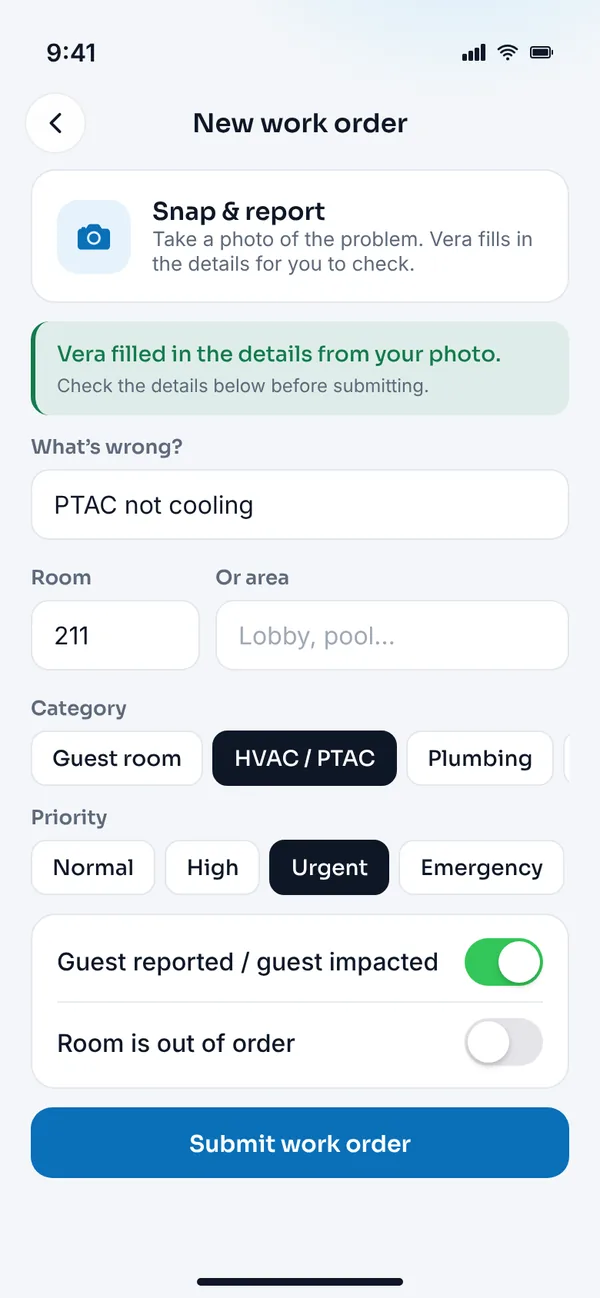
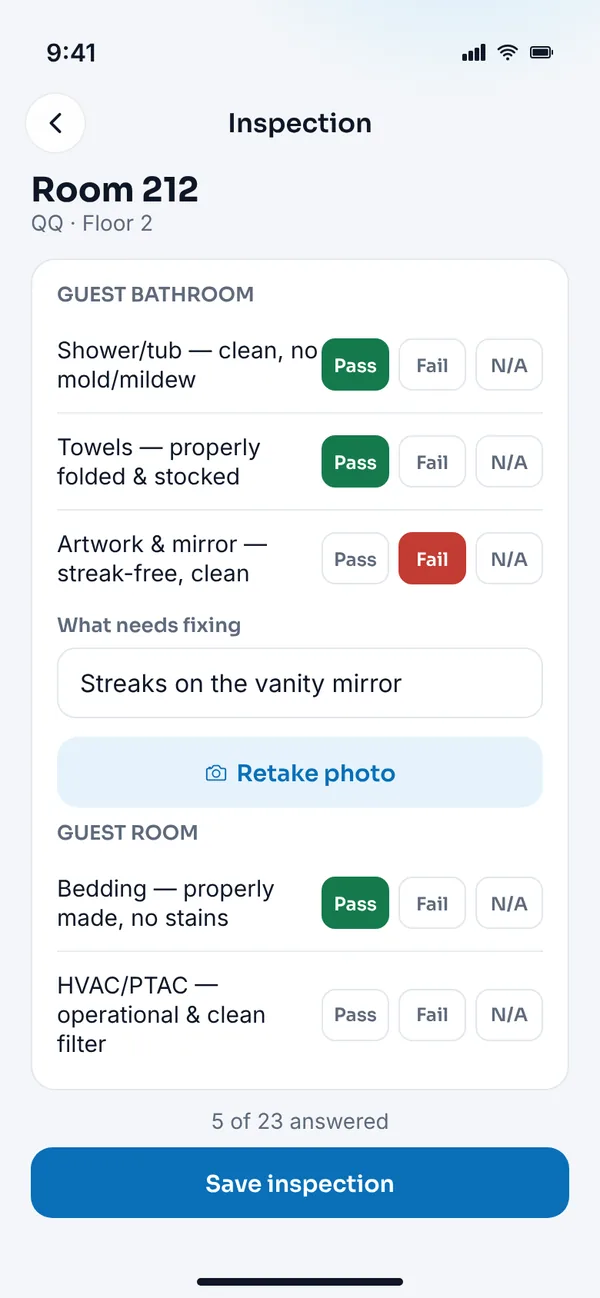


Free for Travera teams — sign in with your Travera account.
Click around a real Travera workspace.
Open rooms, filter the board, switch tabs and open work orders in a sample hotel. No sign-in or details needed, and nothing you do is saved.
Loading the interactive demo…
Open the live demo Works best on a laptop or tablet.See Travera on your hotel in 30 minutes.
Pick a time. We’ll walk through the Ops Board, work orders and housekeeping using a hotel like yours — and answer every question.
Rather send your details first? Use the form — suggest a few times, or tell us you’re ready to get started.
- Tell us about your property
Where you are, how many rooms, and what you run today.
- Get your property set up
We will get Travera running on a setup that matches your property.
- Help shape what comes next
Hotels running Travera help decide what we build next. No obligation.
Questions? Landon@greyridgehq.com